1b. Consolidated Shipping Process
Consolidation Warehouse & International Express Parcel Operating Procedures
For shipping rates and detailed processes, please refer to the [Consolidation Warehouse] section after selecting your country on the Official Website Homepage.
To check shipping costs in advance, click [Freight Estimator].
*Simple Shipping Process: Register → Inbound (Arrive at Warehouse) → Create Waybill → Packing Completed → Payment → Outbound (Dispatch) → Delivery Received
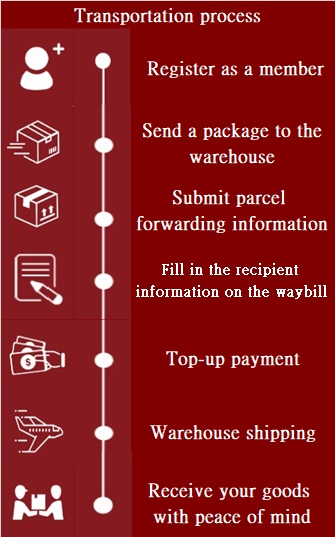
1. Consolidation Warehouse Operating Instructions:
a.Register: Sign up for a free membership to receive trial discount coupons. Provide your Member ID to our customer service via Line@lgg6811g.
b.Warehouse Address: Find the overseas [Warehouse Address] on the homepage to use when ordering goods. Your Member ID must be included after the warehouse address.
c.Tracking Number: Once the online seller dispatches your package, you will receive a Seller's Tracking Number.
d.Inbound Notification: When the package arrives at the warehouse, it will be weighed and checked into the system. You can check this under [Parcel Status Inquiry]. An email notification will be sent, and records can be found in the system's [Internal Message] center.
e.Create Waybill: Go to the homepage under [Hong Kong Red Sea International Logistics -- Create Waybill] and choose a waybill type:
*[Pre-declaration Waybill]: Use this when the seller has shipped and you have a tracking number, but the package has not yet arrived at the warehouse. (Note: Consolidation/Merging is not available for this option).
*[Create New Waybill]: Use this once the package has arrived at the warehouse (Inbound). You can consolidate multiple boxes or ship individually.
*[Pre-arrival Notification]: Use this if the seller's website does not allow you to input your Member ID in the address field.
Select Service Type:
*[Consolidated Express]: Shipping via Air or Sea from the Consolidation Warehouse to Taiwan.
*[International Express (DHL/UPS/FEDEX)]: Sending packages from Taiwan/USA/UK to other international destinations.
2. Additional Information:
*Billing: Once the waybill is generated and packing is complete, you will receive an email notification regarding the fees. You can check status under [Waybill Progress Inquiry] and pay via [I Want to Pay].
*Automatic Deduction: After topping up your balance, the system will automatically deduct the payment before dispatch and arrange air transport to the destination.
*Tracking: Use [Waybill Progress Inquiry] anytime to track your package's status. The Customs Real-Name Authentication App (EZ WAY) will also notify you of Taiwan Customs progress.
*Support: For other questions, please refer to [FAQ B0~B14] or contact our [Line@ Customer Service].
Shipping Process Steps
Step 1: Icon Description Once the package arrives at the warehouse and the weight is entered, you can confirm it in [Parcel Status Inquiry].
Step 2: Start Waybill After confirming arrival, go to the homepage [Hong Kong Red Sea International Logistics] and select [Create Waybill]. Choose from three options:
*[New Consolidation Waybill]: Package is already in the warehouse; supports merging 1 to multiple boxes.
*[Pre-declaration Waybill]: Package has not yet arrived; single package fast-dispatch (no merging).
*[Pre-arrival Notification]: Use if the Member ID could not be filled in at the time of purchase.
Step 3: Route Selection Enter the Origin and Destination countries. Select the specific Consolidation Warehouse. After filling in the basic info, click [Query Inbound Packages for Dispatch].
Step 4: Select Packages Available packages will appear below. Click [Select] for each package. If consolidating multiple items, ensure you click [Select] for every item you want to include.
Step 5: Consignee Information Scroll down to fill in the Import Customs Clearance recipient and the final Delivery recipient information.
Step 6: Item Details Fill in the cargo information. Please list multiple items separately by clicking the [ + ] icon to add new rows.
Step 7: Insurance If insurance is required, please read the remarks and terms carefully.
Step 8: Value-Added Services Please read the service descriptions carefully before selecting.
Step 9: Finalize Check the remaining fields based on your needs. Check the box [I have read the relevant Service Agreement], then select [Generate Waybill] or [Continue Creating Waybills].